Free for iPhone and Android, no account needed

Your items, organised.

Take a photo and the details fill themselves in. After that you know where everything is, what it's worth and who borrowed it, all on your phone.

Download on the App Store QR code linking to additem.to on the App Store Scan to install
on iPhone
Get it on Google Play QR code linking to additem.to on Google Play Scan to install
on Android

Or try Pro free for 7 days, no card needed →

iPhone & iPad • iOS 17.6+ • Android 8.0+
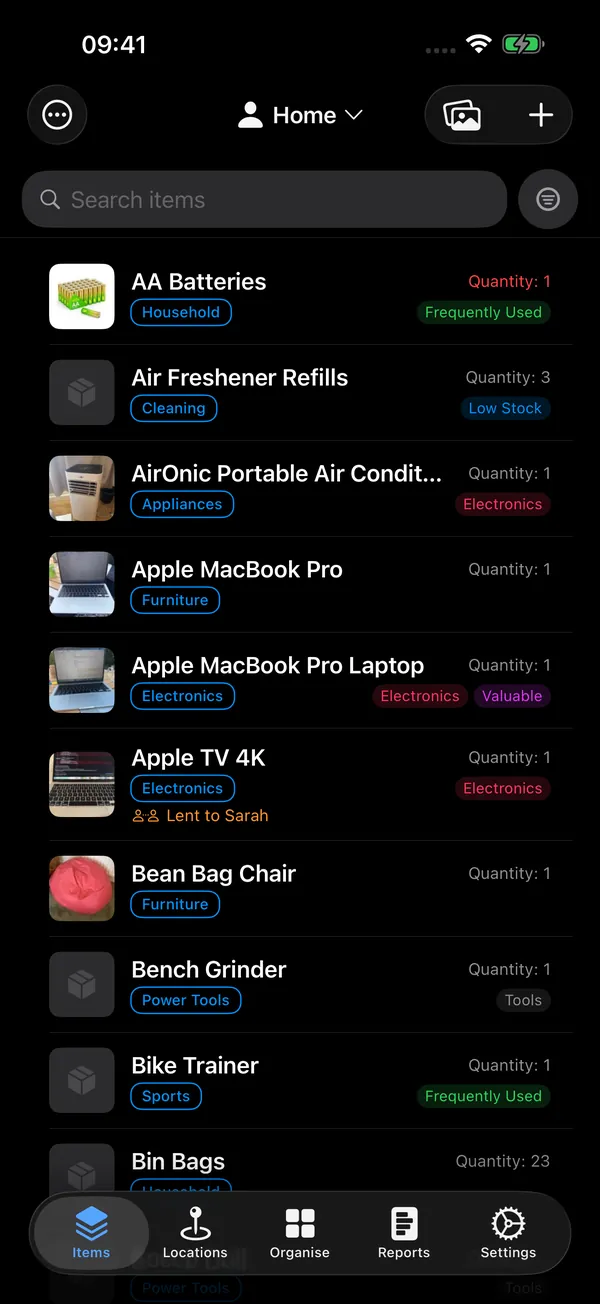
The additem.to app on an iPhone, adding, finding and lending items
Scan with AI screen, where you point your camera and additem.to fills in the item's details

Add items with AI

Point your camera at something and AI suggests its name, brand, model and category, even your own custom fields. You check it, then save.

Locations list with QR codes

Organise by room

Make a location for each room, shelf or box, like the garage or the shed, and put things where they really are.

Item with NFC tag, QR code, and barcode linked

Tag items with NFC, QR, or barcodes

Stick an NFC tag, QR code or barcode on anything and tap or scan it to jump straight there. The QR codes you make even open straight from your phone's camera, on iPhone and Android.

Activity history showing check-ins, edits, and changes

See what happened

Every check-in, edit and change of quantity, with who made it, grouped by day.

Why it exists

Keeping a list of your own things should be free.

It started with a new house and a list for the insurance. Every app I tried was either built for IT departments, or stopped at 50 items and asked for a subscription.

So I made the one I wanted. Photos, serial numbers and where everything lives, all on your phone and working without internet. Tapping an NFC sticker on a shelf to see what's on it turned out to be the part people like most.

  • Free, with no limit on items
  • Works without internet
  • Support from the people who build it
Read how it started

What else it does

Count things, like screws or shop stock. Tag things as Valuable or Warranty, then filter by them. Lend things out and see who has them. Do a stocktake to check everything is still there. See what it's all worth, room by room, and send your insurer a PDF.

See everything it does

Where it helps

At home, in a shop or at work, it's the same problem. You can't find something, or you can't prove you had it.

Your inventory on every device

additem.to runs on iPhone, iPad and Android, and one subscription covers them all. Buy Pro Cloud once, in the App Store, on Google Play or on the web, then sign in with the same account on your other devices. Every item, photo and change follows you, on your phone, your tablet and in your browser.

Ready for iPhone and iPad

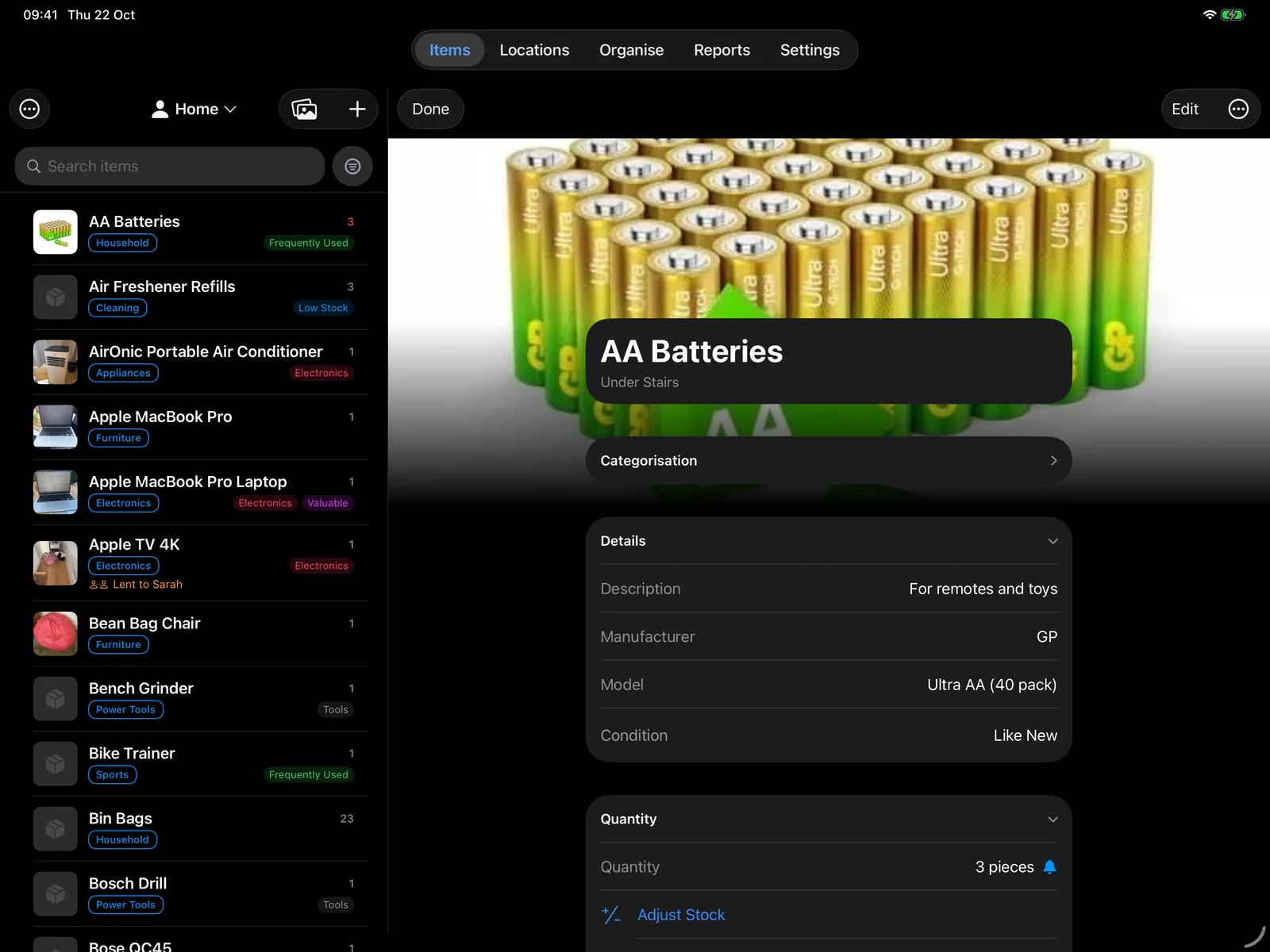
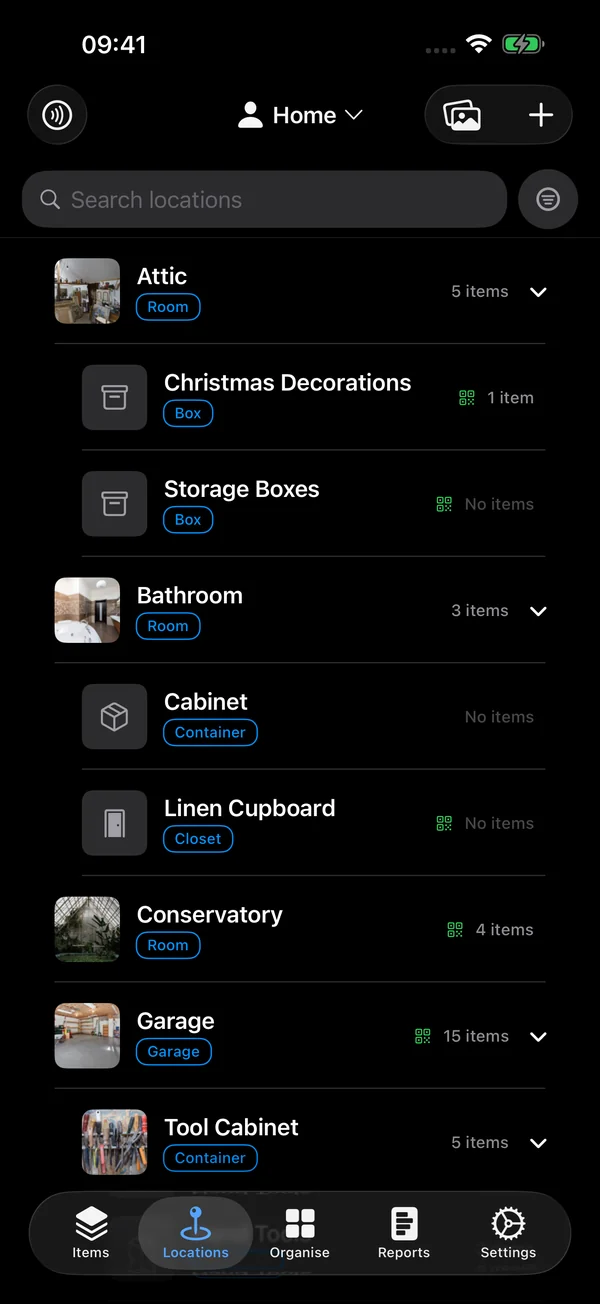
On iPhone it fits in one hand. Turn an iPad sideways and the list sits beside whatever you open.

Get it on the App Store

additem.to on iPad in landscape, the items list beside AA Batteries and its details
additem.to on iPhone, showing the locations list

Ready for iPhone Duo

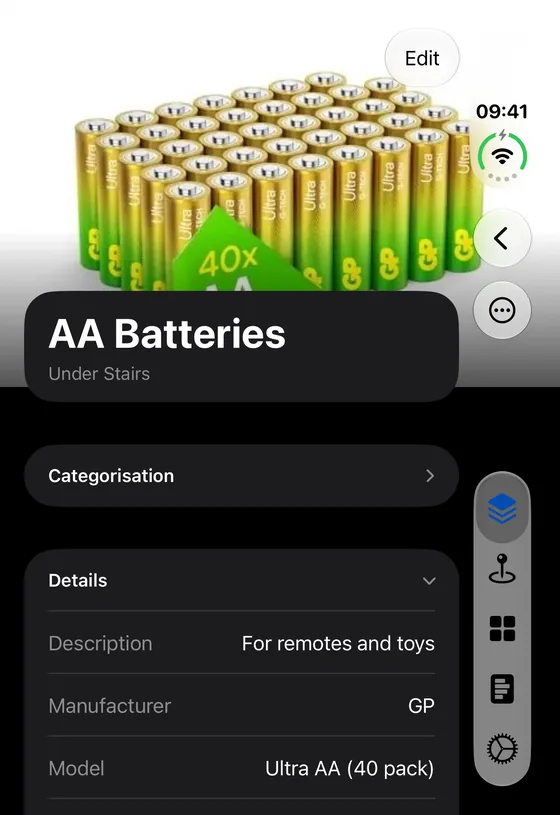
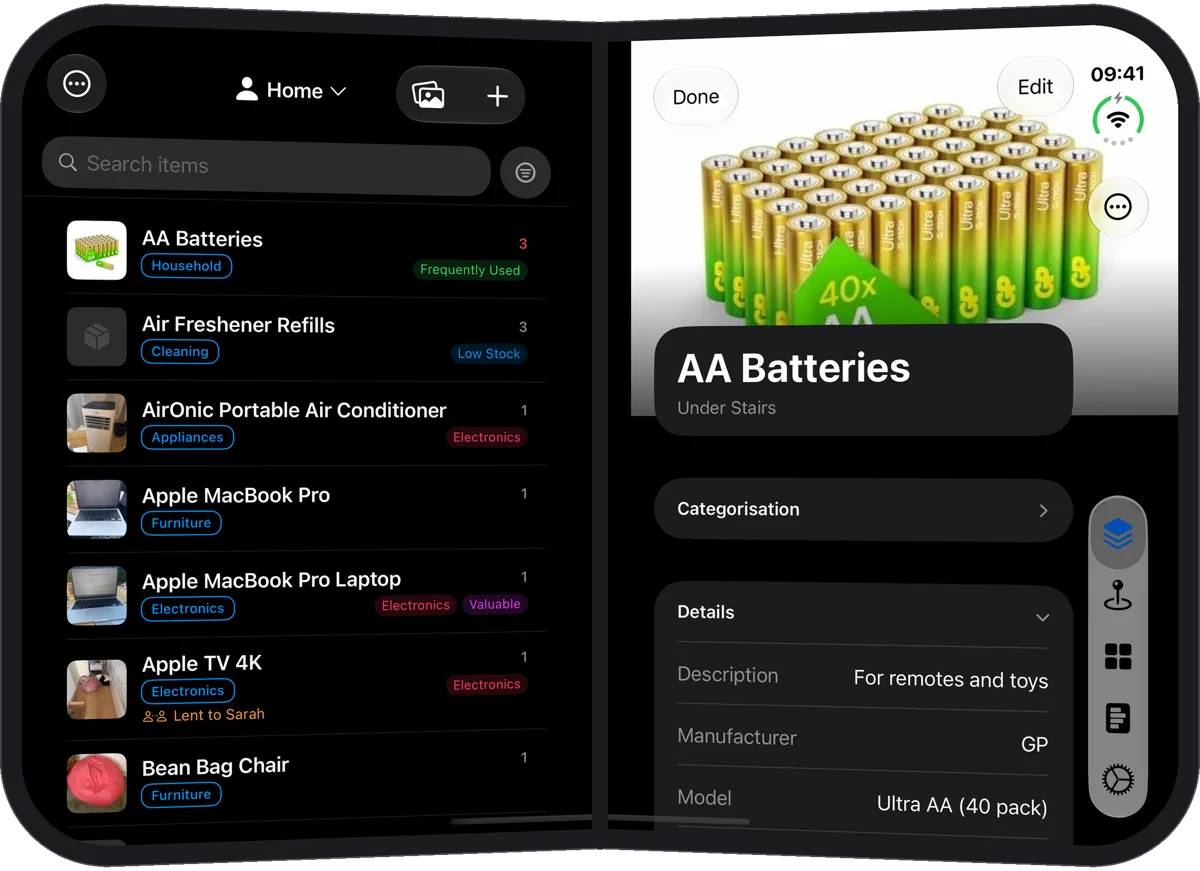
Use it folded like any iPhone. Hold it open like a book and the list sits on one page while the item you open fills the other, with nothing on the fold.

See every way it works on the Duo

additem.to on iPhone Duo folded, showing an item's details
additem.to on iPhone Duo held like a book, the items list beside an item's details

Ready for Android

The same app on Android phones and tablets. Turn a tablet sideways and the list sits beside whatever you open. Sign in with the same account and Pro Cloud keeps every device in step.

Get it on Google Play

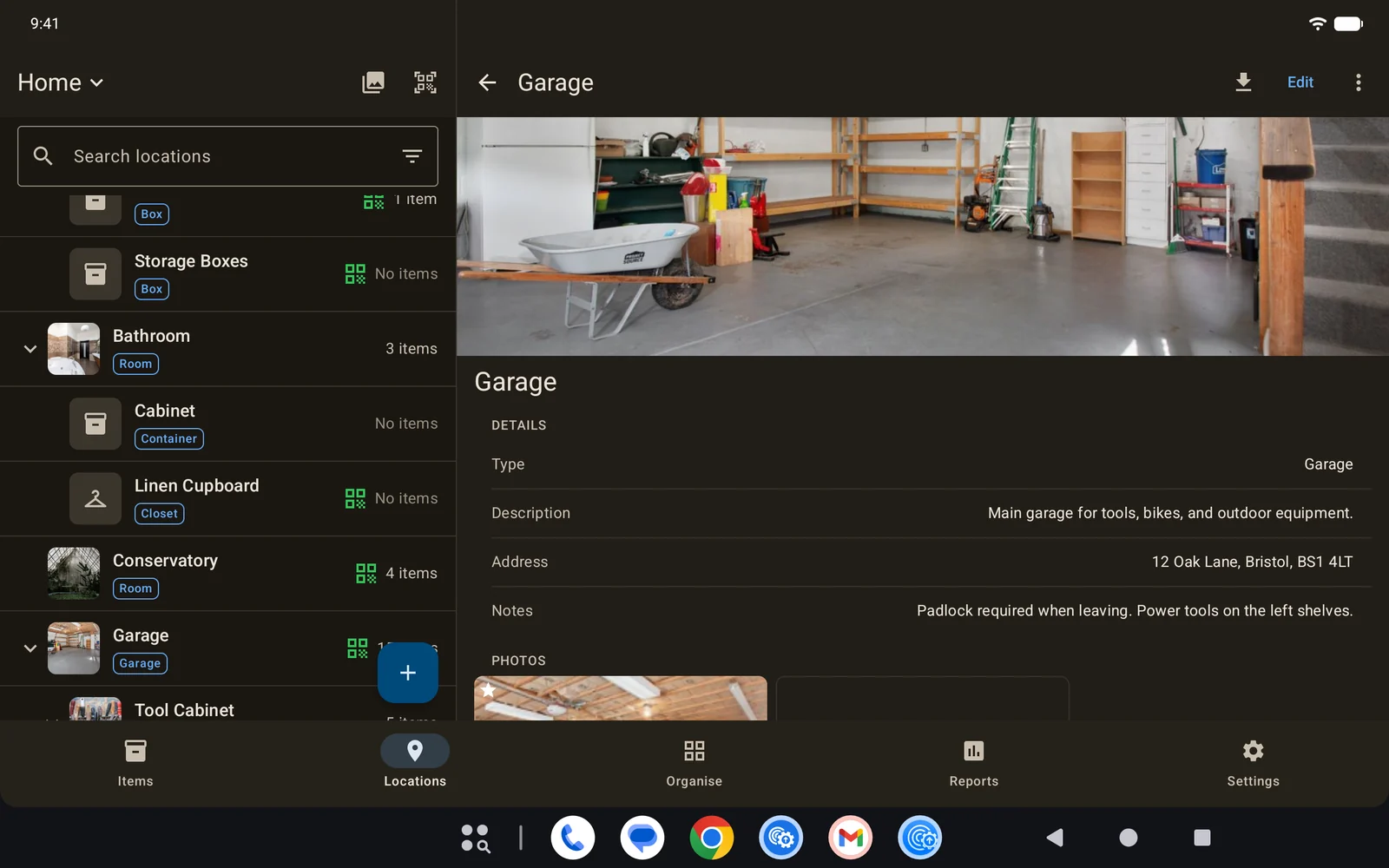
additem.to on an Android tablet in landscape, the locations list beside the Garage and its photo
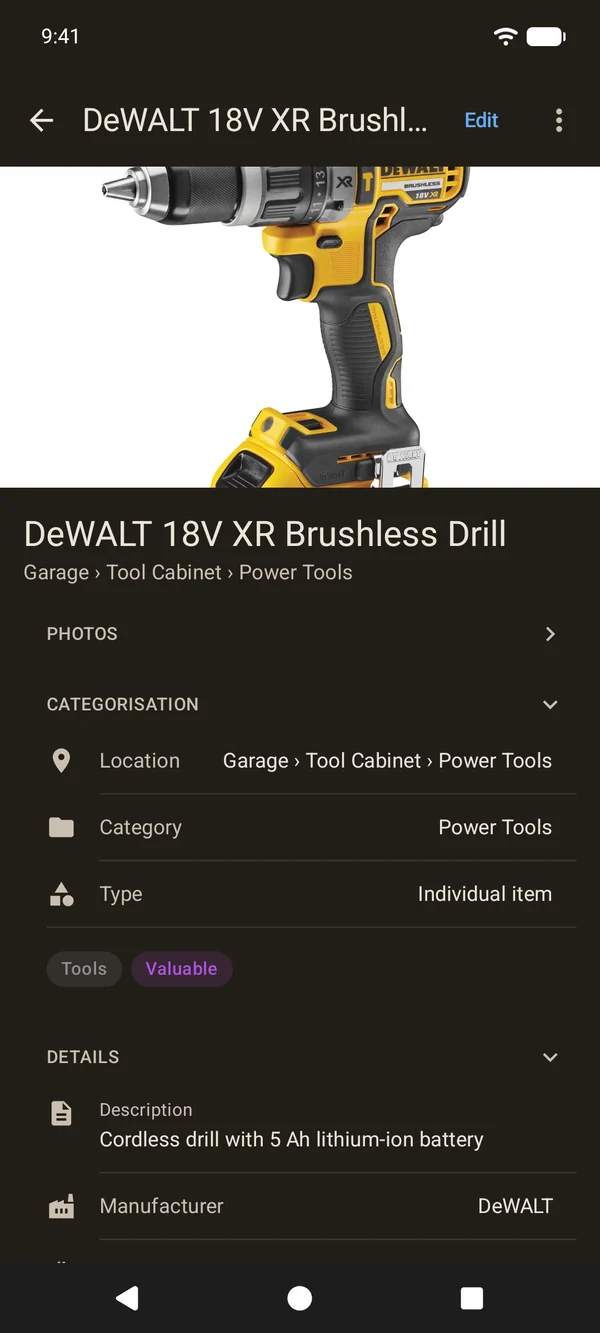
additem.to on an Android phone, showing an item's details

Also in your browser

Pro Cloud comes with the web app at app.additem.to. It's handy for the big jobs, like importing a spreadsheet or getting a report together for your insurer, and it stays in sync with your phone.

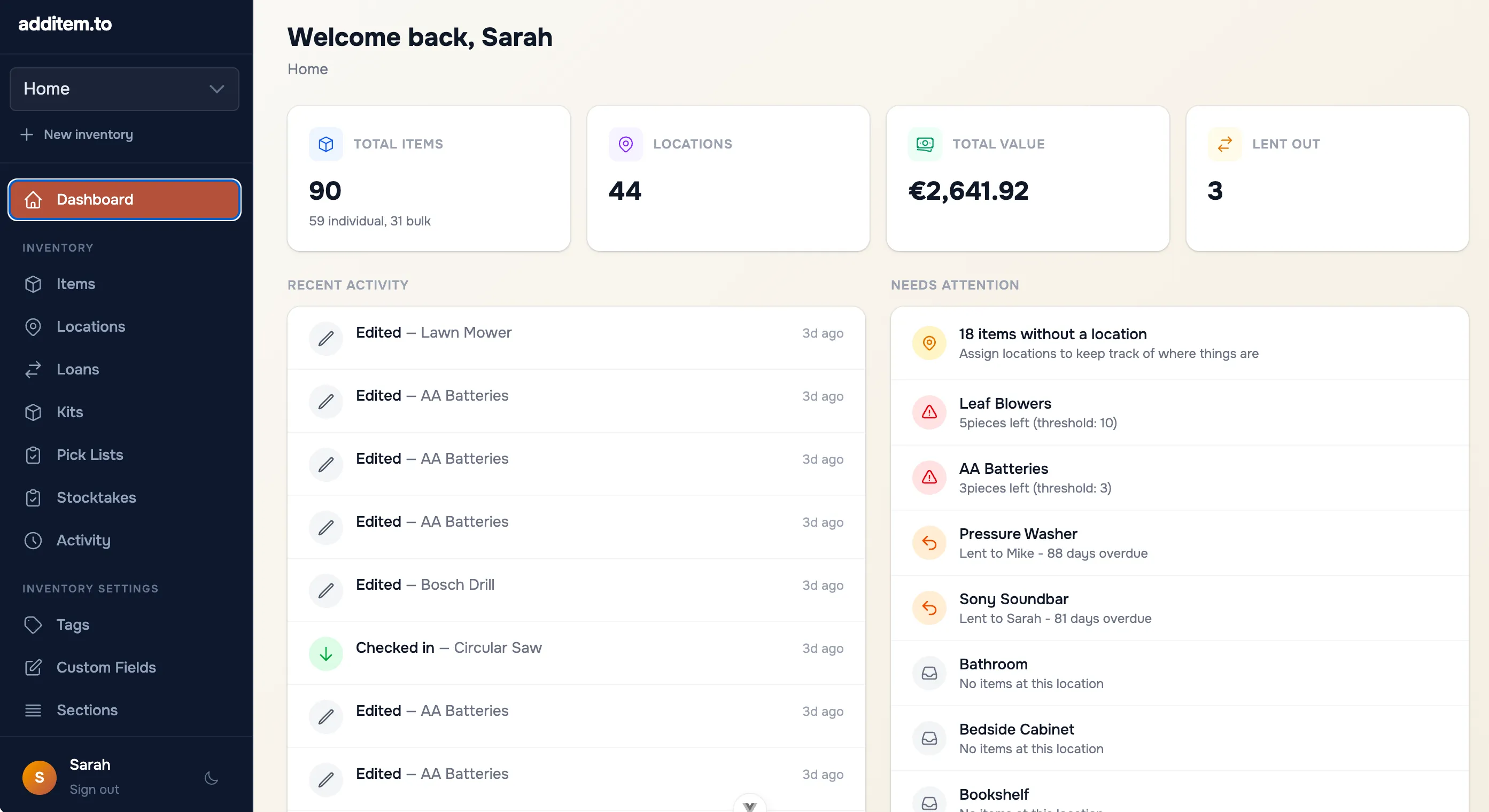
app.additem.to
additem.to web app dashboard showing item count, total value, and locations
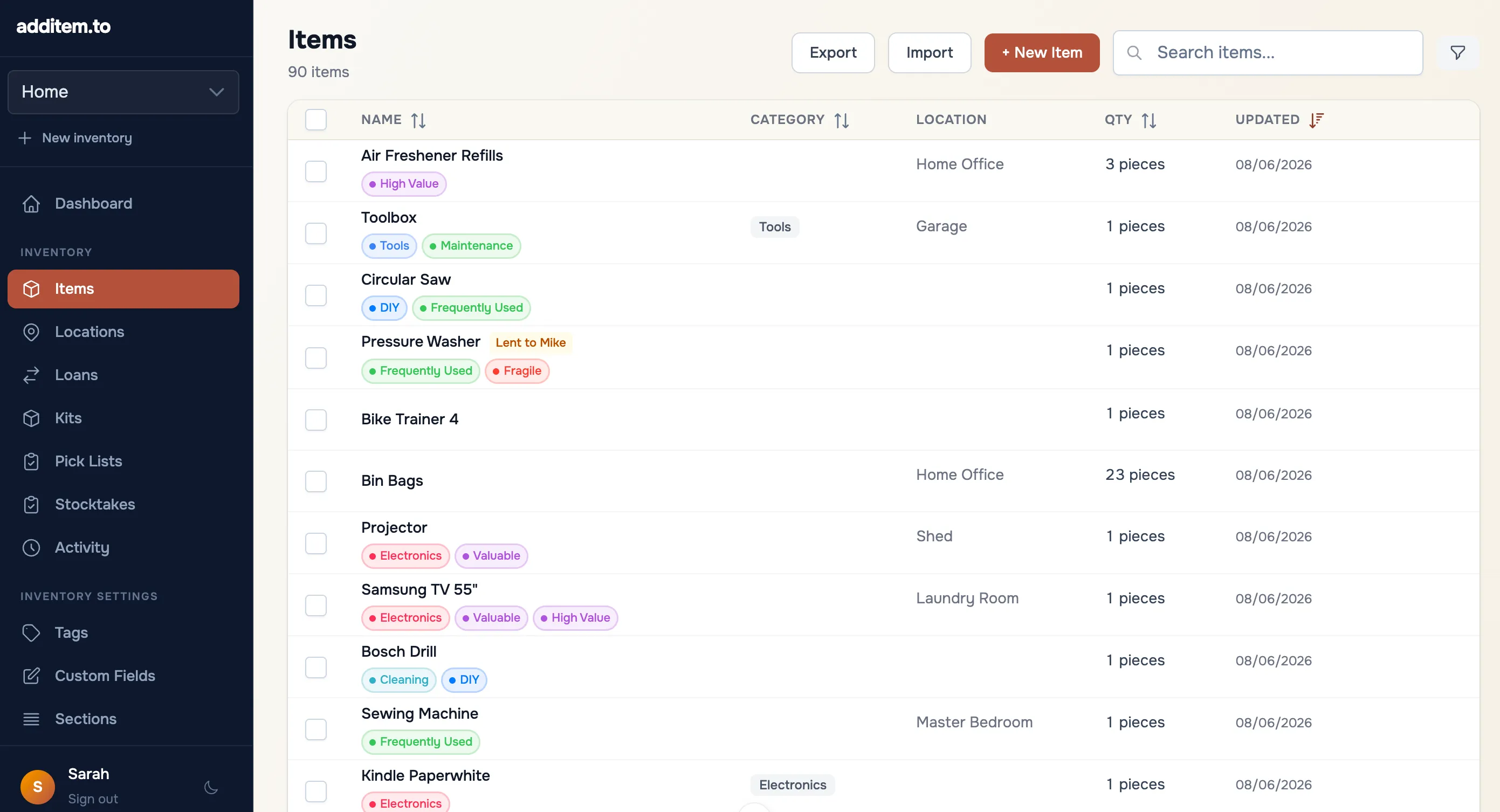
app.additem.to
Web app items list with tags, categories, and locations

Browse your items

Search, sort and filter on a big screen, and import or export a CSV.

app.additem.to
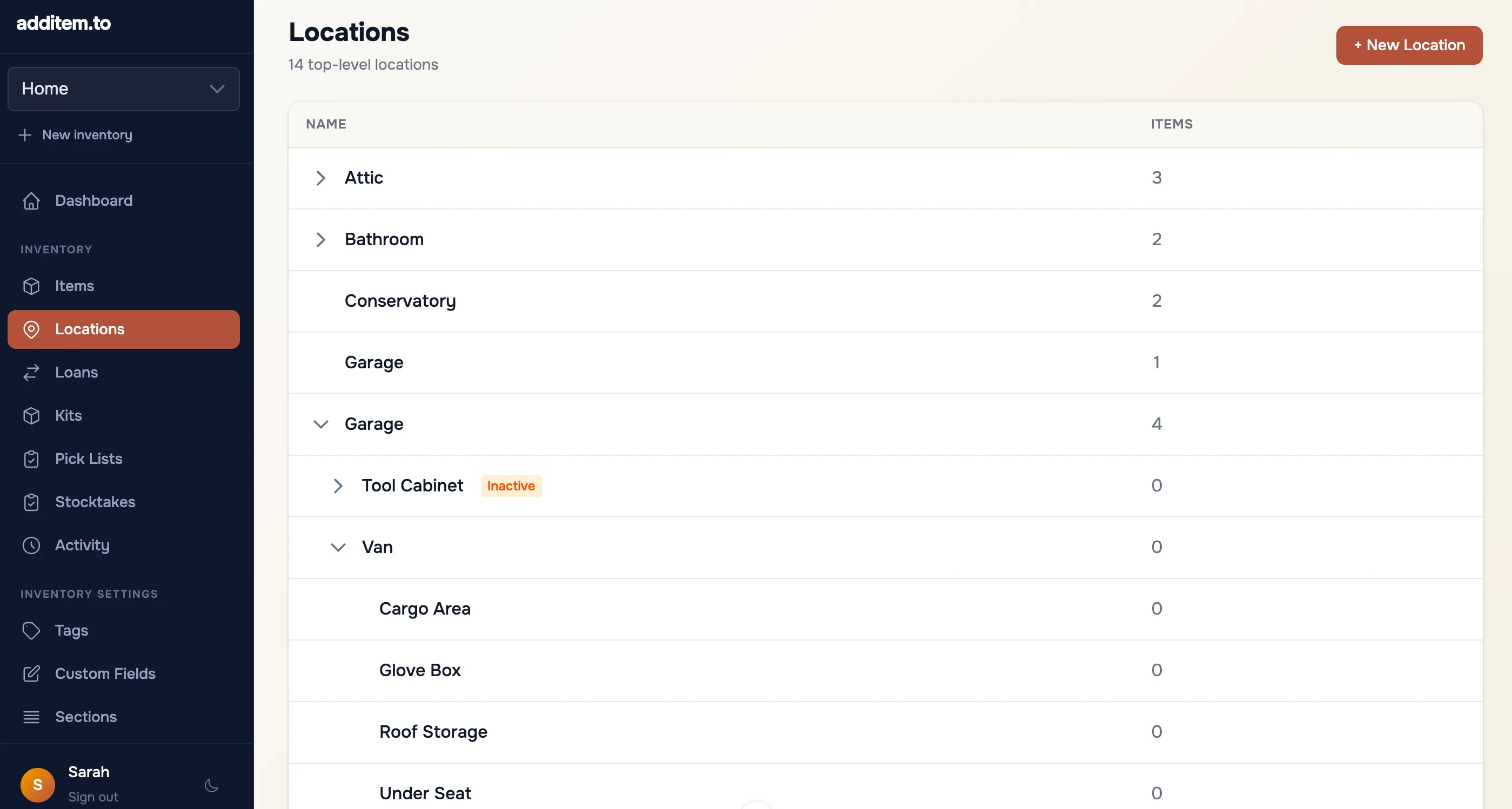
Web app locations list showing item counts per location

Manage locations

See what's in each location and reorganise from your desk.

In your language

additem.to is in 15 languages and follows the language your phone is set to.

Free to use, for good

The free app does everything most people need, on iPhone and Android. Upgrade if you want cloud sync or web access.

Pro Local

£9.99/year

For iPhone, iPad and Android, with more power. No cloud needed.

  • All Free features
  • Unlimited inventories
  • Unlimited tags
  • Unlimited custom fields
  • Unlimited photos per item
  • Item templates
  • AI item & receipt scanning (200/month)
Download on the App Store Get it on Google Play

Pro Cloud

£49.00/year

Your data on all your devices, safely backed up.

  • Everything in Pro Local
  • AI item & receipt scanning (1,000/month)
  • Cloud sync & backup
  • Web app - access from any browser
  • Photo backup
  • Share with up to 5 people
Start free trial

Pro Cloud has a 7-day free trial at app.additem.to, with no card needed. Cancel anytime. Your items stay on your phone if you cancel.

Need more than five people? Business, for teams of up to 25, is coming soon.

See everything included in the free plan →

Feature Free Pro Local Pro Cloud
Items & Organisation
Items Unlimited Unlimited Unlimited
Locations Unlimited Unlimited Unlimited
Inventories separate item lists 1 Unlimited Unlimited
Tags per inventory Up to 25 Unlimited Unlimited
Custom fields per inventory Up to 5 Unlimited Unlimited
Photos per item Up to 10 Unlimited Unlimited
Item templates Up to 2 Unlimited Unlimited
Kits Up to 2 Unlimited Unlimited
Tracking & Scanning
AI item & receipt scanning requires sign-in, one shared allowance 25 scans 200 / month 1,000 / month
NFC tag scanning ✓ ✓ ✓
QR code scanning ✓ ✓ ✓
Barcode scanning ✓ ✓ ✓
Print QR & barcode labels ✓ ✓ ✓
Stocktake ✓ ✓ ✓
Lending tracking ✓ ✓ ✓
Data & Reporting
CSV import & export ✓ ✓ ✓
Reports & PDF export ✓ ✓ ✓
Full activity history ✓ ✓ ✓
Low stock alerts ✓ ✓ ✓
Reminders on date fields ✓ ✓ ✓
Cloud & Sync
Works offline ✓ ✓ ✓
Cloud sync & backup – – ✓
Web app (app.additem.to) – – ✓
Photo backup – – ✓
Share inventory with up to 5 people – – ✓

Questions people ask

Is it really free?

Yes. The free version has unlimited items, up to 10 photos per item, NFC, QR and barcode support, and CSV import/export. No account needed. Paid plans unlock extra features but the free version does everything most people need.

Can it tell me where I put something?

Yes, that's what it's for. Places nest inside each other as deep as you like, so a drill can live in the garage, in the blue cabinet, on the second shelf. Open the drill to see exactly where it is, or open a room and work down to the box. Stick an NFC sticker or a printed QR label on a box, then tap or scan it to see what's inside without opening it. Each place can have its own photos too.

How does AI scanning work?

Point your camera at an item (or pick a photo) and additem.to suggests the name, brand, model, category and your custom fields, and you review everything before it saves. Photograph a shelf or a worktop instead and it lists everything on it, so you can add the lot at once. You can also re-scan an item you already have to fill in details you skipped. Photograph a receipt instead and it reads the shop, the total and the purchase date, and fills them onto the item. If the receipt lists several things, you pick which line is yours. Receipts are spotted automatically, so you don't have to tell the app what it's looking at. It's opt-in per scan and needs a free account, because the photo is sent to OpenAI for analysis. It isn't used to train their models. Everyone gets 25 free scans, and Pro plans include more each month.

Does it work without internet?

Fully. Your data lives on your phone. No internet required to add items, scan tags, or run a stocktake. Cloud sync is optional and only available on Pro Cloud.

Where is my data kept?

On your phone. The free app and Pro Local keep your items there and don't send them to us. With Pro Cloud a copy is kept on our servers so your devices can sync, and it's deleted 30 days after your plan ends. Scan with AI sends the photo you scan, with your inventory's name and the names of its categories, tags and fields, and only when you tap it. The privacy policy has the details.

Do I need an account?

No, not for the core app. Download it and use it without signing up. A free account is only needed for AI scanning, cloud sync across devices, or the web app.

Does it sync through iCloud?

No. Items sync through your additem.to account with Pro Cloud. Sign in with the same account on each device and they stay in sync. iCloud Backup still includes the app's data in your normal device backup, like any other app, but a backup does not move items between devices.

Does it work on Android?

Yes. additem.to is on Google Play for Android 8.0 and later, as well as on iPhone and iPad (iOS 17.6+). One subscription covers every device. Buy Pro Cloud once, in the App Store, on Google Play or on the web, then sign in with the same account and it works on your other phones and tablets and in the web app too.

What are NFC tags?

Small stickers you stick to shelves or boxes. Tap your phone on one and the app instantly shows what's stored there. Turn on Tap to Open and a tap opens the item even when the app is closed. About £8 to £15 for a pack of 10 to 20 on Amazon. QR stickers work the same way using your camera.

What is Pro Cloud?

Pro Cloud (£4.99/month) adds cloud sync, backup, web access at app.additem.to, and inventory sharing with up to 5 people, and you can try it free for 7 days. Pro Local (£9.99/year) is cheaper and adds unlimited inventories, custom fields, and item templates but keeps everything on your phone.

Can I share with others?

Yes, with Pro Cloud. Invite up to 5 people with a link. Each one is View only, who sees everything and changes nothing, or an Editor, who can add, change, move and delete items. They don't need Pro Cloud. A free account is enough.

What happens if I cancel?

Sync and web access stop, and we keep the cloud copy for 30 days, then delete it. Your items stay on your phone. The free plan has one inventory, so your oldest stays open and any others are locked until you subscribe again. Photos you've never opened on that phone are only kept small, so open the ones you want at full size before the 30 days are up. If you only use the web app, export a CSV before your plan ends.

Can I import a spreadsheet?

Yes. Import a CSV file from a spreadsheet or another app and your columns are matched to the app's fields for you. Locations and tags are created as it goes, and columns the app doesn't recognise become custom fields. A file of 20,000 items imports in seconds. You can export everything to CSV too, free on every plan.

Can I access from a computer?

Yes with Pro Cloud. The full web app at app.additem.to works in any browser, for browsing items, managing locations, importing and exporting, and more. The web app guide covers it all.

What are item templates?

Templates let you pre-fill fields when adding a new item. Create a "Camera" template and it can set the default category, show the serial number and model fields, and hide fields you don't need. Pick a template when you tap the + button and the form is ready to go. Free includes 2 templates, and Pro plans have unlimited. You'll find them in Organise › Templates.

Is there a free trial for Pro Cloud?

Yes, for 7 days, when you create your account at app.additem.to. There's no card needed, just sign in with Apple or Google. Made your account in the app? Sign in at app.additem.to and tap Start a free trial. If you don't add a card the trial just ends, and you're never charged. The trial includes 25 AI scans. The 1,000 a month starts when you pay.

What people say on the App Store

★★★★★
This is exactly what has been missing from the home inventory apps, and I am so thrilled for a good option. I just successfully uploaded my first csv of items to the app, and it is glorious... Privacy for my items is a big deal to me, and this app seems to check off everything on my list.
App Store review · App Store
★★★★★
This app is exactly what I was looking for. I always get annoyed when I can't find a replacement light bulb or some spare part I bought years ago. Now I can keep track of everything!
App Store review · App Store
★★★★★
It’s so simple and intuitive, but still so flexible and powerful and customizable. And I love love LOVE that my data stays with me and doesn’t get sold a million times... you can tell that this developer/creator is an actual human and not just a money-hungry corporation.
App Store review · App Store

Give it a go

It's free, there's no account to set up, and everything stays on your phone.